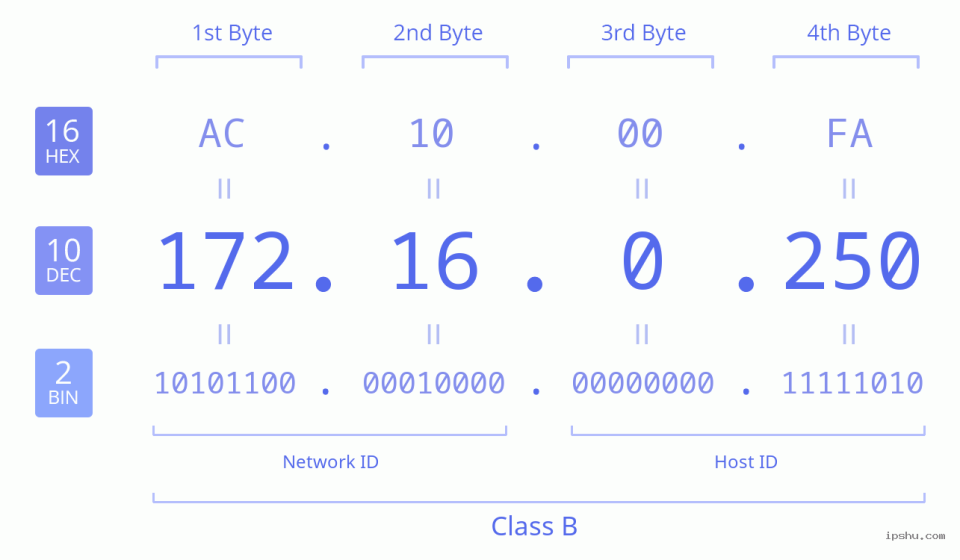

In the world of networking, IP addresses and port numbers play a crucial role in connecting devices, managing systems, and accessing web-based interfaces. One address that often appears in private network environments is 172.16.0.250.8090. Although it may look like a regular web address, it actually represents a combination of a private IP address and a specific port number used for communication within a local network.
Many users encounter this address while setting up routers, security systems, servers, business applications, or other network-enabled devices. Understanding what this address means, how it works, and how to troubleshoot common problems can make network management much easier.
This guide explains the purpose of 172.16.0.250.8090, its practical uses, security considerations, and solutions for common access issues.
What Does 172.16.0.250.8090 Represent?
To understand this address properly, it is important to separate it into two parts:
- 172.16.0.250 – This is a private IP address assigned to a device inside a local network.
- 8090 – This is a port number that identifies a specific service or application running on that device.
Together, they create a network destination that allows users to access a particular service through a browser or specialized software.
Unlike public IP addresses used on the internet, private addresses like 172.16.0.250 are designed for internal communication. They are commonly found in homes, offices, schools, and enterprise environments where multiple devices need to communicate securely.
Understanding Private IP Addresses and Their Role
Private IP addresses are reserved ranges that allow organizations to build internal networks without requiring a unique public IP for every device.
The main private IP ranges include:
| IP Range | Common Usage |
|---|---|
| 10.0.0.0 – 10.255.255.255 | Large enterprise networks |
| 172.16.0.0 – 172.31.255.255 | Medium-sized private networks |
| 192.168.0.0 – 192.168.255.255 | Home routers and small networks |
The address 172.16.0.250 belongs to the second range. It can be assigned to devices such as network controllers, cameras, servers, printers, or management systems.
The important point is that this address is only accessible from the same local network unless additional networking methods are configured.
Why Is Port 8090 Used?
A port works like a communication doorway for different applications. A single device can run multiple services simultaneously, and ports help direct traffic to the correct service.
For example:
- Port 80 is commonly associated with standard HTTP websites.
- Port 443 is used for secure HTTPS connections.
- Port 8090 is often selected by software developers for custom web interfaces, management dashboards, or internal applications.
The exact purpose of port 8090 depends on the device or software configuration. There is no universal service permanently attached to this port.
A network administrator may configure this port for:
- Device management panels
- Monitoring dashboards
- Internal applications
- Camera systems
- Business software platforms
- Development environments
How to Access 172.16.0.250.8090
If a device is configured correctly, accessing this address is usually straightforward.
Follow these steps:
- Connect your computer or smartphone to the same local network.
- Open a modern web browser.
- Enter the address using the proper format:
http://172.16.0.250:8090
- Press Enter.
- If the service is active, the login page or application interface should appear.
Remember that the colon between the IP address and port number is required. Writing the address incorrectly may prevent access.
Common Reasons Why 172.16.0.250:8090 Does Not Open
Sometimes users enter the correct address but cannot reach the page. Several factors can cause this issue.
Device Is Not Connected to the Network
The device using this IP address must be powered on and connected. A disconnected cable, weak Wi-Fi signal, or hardware failure can prevent communication.
Incorrect IP Address Assignment
IP addresses can change when devices use automatic network settings. If the device receives a different address through DHCP, the old address will no longer work.
Port 8090 Service Is Not Running
Even if the device responds, the application using port 8090 may be stopped. Restarting the service or device may resolve the problem.
Firewall Restrictions
Security software or network firewalls can block certain ports. Administrators should check firewall rules if access is restricted.
Network Isolation
Some routers separate wireless devices from wired devices for security reasons. In this case, a connected laptop may not communicate with another device on the network.
Practical Example of Using This Local Address
Consider a small company that installs an internal monitoring system for its employees. The administrator assigns the monitoring server the IP address 172.16.0.250 and configures its management dashboard to operate on port 8090.
Employees responsible for IT maintenance can open the browser, enter the local address, and manage the system without exposing it publicly to the internet.
This approach improves security because the management interface remains inside the company’s private network.
Comparison Between Local IP Access and Public Internet Access
| Feature | Local IP Access (172.16.0.250:8090) | Public Internet Access |
|---|---|---|
| Availability | Limited to internal networks | Accessible worldwide |
| Security Level | Generally safer when properly configured | Requires stronger protection |
| Speed | Usually faster within LAN | Depends on internet connection |
| Common Use | Device management and internal tools | Websites and online services |
| Configuration | Managed by network administrators | Managed through hosting providers |
Understanding this difference helps users choose the right setup for their requirements.
Security Tips When Using 172.16.0.250.8090
Although private network addresses are not directly exposed online, security should still be a priority.
Consider these practices:
- Change default usernames and passwords.
- Keep device firmware updated.
- Disable unnecessary services.
- Restrict access to trusted users.
- Use encrypted connections whenever possible.
- Monitor unusual network activity.
A private network is not automatically secure. Poor configuration can still create vulnerabilities.
Personal Experience With Local Network Management
I once helped configure a small office network where an internal dashboard was accessible through a custom port similar to 8090, and identifying the correct IP and service settings quickly solved the connectivity issue.
Best Practices for Managing Devices on Private Networks
Effective network management requires organization. Keeping a record of assigned IP addresses, device names, and active ports can save significant troubleshooting time.
Network administrators often maintain documentation containing:
- Device location
- Assigned IP address
- Software running on each port
- Access permissions
- Maintenance schedules
This simple practice prevents confusion as networks grow.
FAQs
What is 172.16.0.250.8090 used for?
It is typically used to access a service running on a device inside a private network. The exact purpose depends on the software or hardware configuration.
Can I access 172.16.0.250.8090 from outside my home or office?
Normally, no. Private IP addresses are designed for local networks. External access requires special configurations such as VPN or secure remote access solutions.
Is 172.16.0.250 a public IP address?
No. It belongs to the private IP address range reserved for internal networks.
Why does the browser show an error when opening this address?
Possible causes include incorrect network connection, inactive services, wrong IP settings, firewall restrictions, or incorrect port configuration.
Is port 8090 safe to use?
Port 8090 itself is neither safe nor unsafe. Security depends on the application using it and how the network is configured.
Also Read: 111.09.150.182 IP Address Guide and Network Info
Conclusion
The address 172.16.0.250.8090 represents an important concept in local networking: the combination of a private IP address and a service port. While it may appear technical at first, understanding how IP addresses and ports work makes device management much simpler.
Whether used for business applications, monitoring systems, or internal dashboards, this type of network access provides a convenient way to control resources within a private environment. Proper configuration, regular updates, and strong security practices ensure that local network services remain reliable and protected.